


Overview Table
| Feature | NVMe SSD | M.2 SSD |
|---|---|---|
| Full Name | Non-Volatile Memory Express | M.2 (Form Factor) |
| Type | Protocol/Interface | Form Factor (physical size) |
| Speed | Extremely fast (up to 7,000 MB/s for PCIe 4.0) | Depends on interface (SATA or NVMe) |
| Interface | PCIe (PCI Express) | PCIe or SATA |
| Compatibility | Motherboards with M.2 PCIe slots | Devices with M.2 slots |
| Cost | Higher | Moderate to high depending on type |
| Use Case | High-performance storage, gaming, content creation | General upgrades, mainstream performance, gaming |
| Heat Generation | Higher; may require heatsinks | Lower for SATA, higher for NVMe |
| Installation | Plug into M.2 slot | Plug into M.2 slot |
| Availability | Widely available | Widely available |
Introduction
The NVMe vs M2 evolution of storage technology has reshaped computing performance. Among the most critical decisions for PC and laptop users is choosing the right type of solid-state drive (SSD). NVMe and M.2 are terms often used interchangeably, but they refer to distinct aspects of modern storage solutions. NVMe defines a communication protocol designed for speed, whereas NVMe vs M2 is a compact form factor that accommodates different types of SSDs, including NVMe and SATA variants.
Understanding the nuances of NVMe vs M2 is essential for buyers seeking maximum performance, reliability, and value. Whether upgrading an older laptop, building a high-end gaming rig, or enhancing a content creation workstation, the right SSD choice can significantly affect system responsiveness, boot times, application load speeds, and overall workflow efficiency.
This article explores the technical distinctions, performance metrics, compatibility considerations, installation guidance, and practical use cases of NVMe vs M2 SSDs. By analyzing each aspect, users can make informed decisions tailored to their devices, workload requirements, and budget constraints.
Understanding SSD Technology
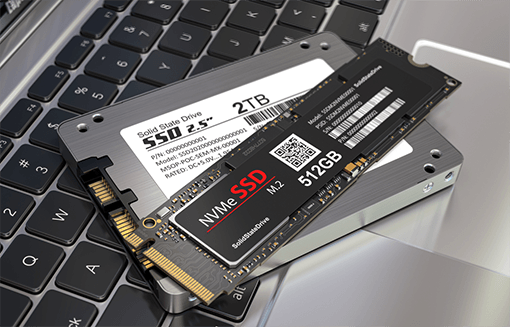
Solid-State Drives (SSDs) have revolutionized data storage, fundamentally changing the way computers operate. Unlike traditional Hard Disk Drives (HDDs), which rely on spinning magnetic platters and mechanical read/write heads, SSDs store data in non-volatile NAND flash memory. This difference eliminates mechanical latency, resulting in faster data access, lower power consumption, and enhanced durability.
SSDs are now ubiquitous across laptops, desktops, gaming rigs, and enterprise servers. Their presence has transformed computing, enabling rapid boot times, instantaneous file transfers, and smoother multitasking. While many users may simply view SSDs as “faster storage,” the technology involves complex engineering principles, interfaces, protocols, and memory management systems that warrant deeper exploration.
The Shift from HDD to SSD
Traditional hard drives (HDDs) rely on spinning platters and mechanical read/write heads, resulting in slower data access and higher latency. SSDs replaced moving parts with flash memory, providing faster boot times, reduced power consumption, and improved durability.
SSD Interface Types
Modern SSDs use either SATA or PCIe interfaces. SATA SSDs offer compatibility but limited speed (up to ~600 MB/s), while PCIe-based SSDs achieve significantly higher transfer rates. NVMe vs M2 is a protocol designed specifically for PCIe to maximize the speed potential of SSDs.
NVMe Explained
Non-Volatile Memory Express, or NVMe, represents a major leap in storage technology, designed to fully exploit the speed potential of modern NAND flash memory. Unlike older storage protocols such as AHCI, which were originally created for spinning hard drives, NVMe is built from the ground up to work with solid-state memory, minimizing latency and maximizing parallelism. This results in dramatically faster read and write speeds, lower latency, and enhanced efficiency for both consumer and enterprise applications.
What NVMe Means
Non-Volatile Memory Express (NVMe) is a protocol that allows SSDs to communicate directly with a system’s CPU over the PCIe bus. This reduces latency, improves parallelism, and significantly increases data transfer rates compared to older AHCI-based SSDs.
Performance Characteristics
NVMe vs M2 deliver superior sequential read and write speeds, often exceeding 3,500 MB/s for PCIe 3.0 and up to 7,000 MB/s for PCIe 4.0 devices. Random read/write performance also improves dramatically, benefiting multitasking, gaming, and data-intensive applications like video editing.
Use Cases for NVMe
- Gaming PCs requiring fast asset streaming
- Video editing and rendering systems
- Database servers and enterprise applications
- Boot drives for rapid system startup
M.2 Explained
What M.2 Represents
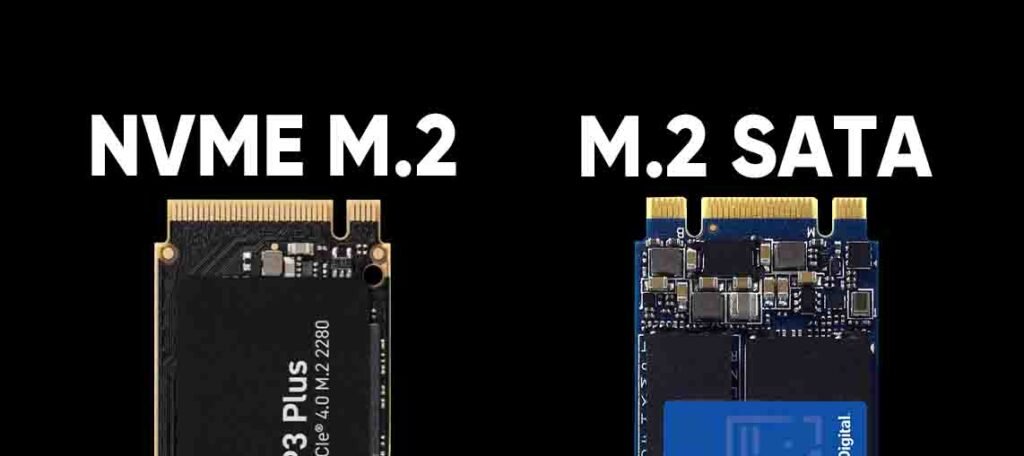
NVMe vs M2 is a physical form factor standard for SSDs and other devices. It describes the shape and connector of the drive, not the speed or protocol. M.2 drives can be either SATA or NVMe-based, which affects performance.
Variants and Dimensions
NVMe vs M2typically come in sizes such as 2242, 2260, 2280, and 22110, where the first two digits represent width (22mm) and the remaining digits represent length (42mm, 60mm, 80mm, 110mm). Compatibility with a device depends on both size and interface support.
Advantages of M.2
- Compact size allows use in laptops and small desktops
- Supports high-speed NVMe SSDs
- Reduces cable clutter compared to SATA drives
Limitations of M.2
- Some older devices only support SATA M.2, limiting speed
- PCIe NVMe drives can generate heat, requiring thermal management
NVMe vs. M.2: Key Differences
Protocol vs. Form Factor
The fundamental difference lies in definition. NVMe vs M2 is a high-speed protocol, while M.2 is a physical form factor. Not all M.2 drives are NVMe; some are SATA-based, which means they operate at lower speeds.
Speed Comparison
NVMe drives in M.2 form factor offer superior speed over SATA-based M.2 drives. While SATA M.2 maxes out around 550–600 MB/s, NVMe vs M2 drives can exceed several gigabytes per second.
Compatibility Considerations
Before purchasing, users must check motherboard support. Some M.2 slots support only SATA, others support both NVMe and SATA. BIOS or firmware updates may also be necessary for older systems to fully support NVMe drives.
Installation Considerations
Desktop PCs
Installing an M.2 NVMe SSD in a desktop is straightforward if the motherboard has compatible PCIe slots. Steps generally include securing the drive with a screw and enabling NVMe support in BIOS.
Laptops
Laptop installations require checking the device’s NVMe vs M2 slot type, supported length, and thermal management. Thin ultrabooks may prioritize heat dissipation, limiting the maximum speed or size of the SSD.
Thermal Management
High-speed NVMe drives generate significant heat. Passive heatsinks or motherboard thermal pads are recommended for sustained heavy workloads to prevent throttling and maintain performance.
Performance Analysis
Sequential and Random Performance
Sequential performance affects large file transfers, while random performance determines responsiveness in multitasking. NVMe drives outperform SATA consistently in both metrics, though real-world impact varies with workload.
Latency and Queue Depth
NVMe vs M2 drives leverage multiple queues to reduce latency and improve efficiency in parallel read/write operations, offering a noticeable boost in system responsiveness for data-intensive tasks.
Boot and Load Times
Using NVMe as a system drive accelerates boot times and reduces application load durations. Gamers and content creators benefit from minimal wait times, enhancing productivity and gaming experience.
Cost and Value Considerations
NVMe SSDs tend to be more expensive than SATA M.2 drives, especially for higher capacities. However, for applications that benefit from maximum throughput, the performance gains often justify the price. For general storage or light usage, SATA-based M.2 SSDs remain cost-effective alternatives.
Choosing the Right SSD for Your Needs
Gamers
Prioritize NVMe vs M2 for faster asset streaming and reduced game load times. Ensure the motherboard supports PCIe 3.0 or 4.0 for maximum benefit.
Content Creators
NVMe vs M2 drives dramatically improve video editing, rendering, and large file transfers. High-capacity drives combined with M.2 form factor optimize both speed and space.
Casual Users
For web browsing, document editing, and media consumption, SATA M.2 SSDs offer sufficient performance at lower cost.
Laptops
Check device compatibility, thermal management, and physical slot dimensions. NVMe vs M2 can enhance speed, but cost and heat may be limiting factors in ultrabooks.
Real-World Use Cases
- Boot drives to reduce system startup time
- Gaming rigs to minimize asset streaming delays
- Video production workstations for faster editing workflows
- Office PCs for general storage acceleration
Advantages and Drawbacks
NVMe Advantages
- Exceptional speed and low latency
- High efficiency in multitasking and data-intensive applications
- Future-proof technology for modern workloads
NVMe Drawbacks
- Higher cost per GB
- Generates heat, may require cooling
- Compatibility issues on older devices
M.2 Advantages
- Compact, versatile form factor
- Supports both NVMe and SATA drives
- Simplifies installation and reduces cable clutter
M.2 Drawbacks
- Speed depends on drive type
- Older NVMe vs M2 slots may limit performance
- Thermal throttling possible on high-speed NVMe
Future Trends in SSD Technology
- Wider adoption of PCIe 4.0 and emerging PCIe 5.0 NVMe drives
- Increased capacities with affordable pricing
- Improved thermal solutions integrated into M.2 designs
- Greater optimization for laptops, ultrabooks, and small form-factor PCs
Conclusion
The decision between NVMe vs M2 ultimately depends on understanding the distinction between protocol and form factor. NVMe vs M2 delivers the fastest speeds and lowest latency, making it ideal for gamers, content creators, and power users. M.2 provides compact form factor versatility and supports both SATA and NVMe drives, making it suitable for nearly all laptops and desktops. By evaluating performance needs, device compatibility, thermal considerations, and budget, users can select an SSD that maximizes both speed and efficiency for their computing environment.
Choosing the right SSD transforms everyday computing, delivering faster boot times, smoother application performance, and an overall more responsive system. Whether upgrading an existing PC or building a new rig, understanding NVMe and M.2 is essential for optimizing modern storage solutions.
